


























Waist Massager Bulk Order Tracking
A wholesale buyer guide to linking waist massager samples, controls, manuals, labels and packing revisions to every bulk-order line.
 Meilan Tech 8 min read

A waist massager bulk order should be approved as a specific configuration, not a model name alone. Put the accepted sample, specification, control variant, manual, labels, accessories and pack artwork under one order revision. Give every carton and inspection record a way back to that revision. This lets a brand or distributor catch mixed versions before stock reaches several channels.
1. Make the purchase order line identify a sellable configuration
“A1, 2,000 pieces” tells a supplier less than a buyer may think. It does not identify the control option, target market, instruction language, accessory set or retail pack. If two channels receive different manuals or boxes, their units need separate order lines or another unambiguous variant code. Otherwise, a correct device can become the wrong retail SKU after packing.
Start with a configuration key that both parties use on the quotation, approved sample, purchase order, packing list and inspection report. The key should include the model, a supplier-confirmed hardware or control revision, market or language set, accessory pack and artwork revision. It need not be a long consumer-facing code; it must be stable enough that a warehouse or quality inspector can identify exactly what was approved. Record the order quantity against each key, not only against the combined order.
Do not use a photograph or a product-page title as the sole identifier. Photos help staff recognize a belt, but they cannot prove the installed controls, instruction version or contents of a sealed carton. A named sample plus a signed configuration register provides a clearer handoff.
2. Connect the approved sample to a controlled document set
One approved physical sample should point to one set of current documents. Give the sample an identifier and record its visible markings and control demonstration. Then list the exact revisions of its specification, instruction manual, label, color box, insert, accessory list and any approved product-page claims. If the sample and a document disagree, mark the affected field unresolved instead of calling both “approved.”
The order register is most useful when it names who approved each item and when. A supplier can update a manual without changing the belt; a brand may approve a new box while keeping the same device. Those are separate changes. The register should show which combination is allowed to ship and which older combination is superseded. For cleaning wording and contact materials, the related waist massager care-label checklist explains how to compare the manual, label and physical surfaces without assuming that one material field describes the whole belt.
3. Keep A1 and A9 facts inside their own configuration rows
Meilan’s published A1 product page describes a pulse-and-heat waist belt with on-device and wireless remote operation for its published configuration. The A9 product page describes an EMS belt with six modes and three intensity levels. These pages are useful starting points for identifying candidates. They do not prove that every quoted A1 or A9 variant has the same controls, accessories, belt measurements or packaging.
Use the chosen model’s own specification and manual when closing a purchase order. Do not fill a missing A9 electrical rating with an A1 value, or move an A1 remote claim into an A9 listing. For each line, ask for a measured belt record, a control demonstration and an opened, fully packed sample. If a sales team wants a comparison table, keep unknown fields blank until the supplier returns version-matched evidence.
| Order field | Record to attach | Decision when mismatched |
|---|---|---|
| Model and control variant | Quoted specification, sample identifier and control video | Hold the line until the physical unit and documents match. |
| Belt and contact layout | Measured sample and labelled inner and outer photographs | Confirm whether the difference is a revision or a wrong model. |
| Manual and retail labels | Versioned language files and printed samples | Replace or reapprove the print set before packing. |
| Accessories and pack | Bill of materials, open-pack photo and carton artwork proof | Separate variants; do not average them into one SKU. |
4. Design a packing check that catches mixed versions
Mixed shipments often arise at a handoff: a correct belt enters a box printed for another option, a revised manual sits beside an older label, or an accessory is pulled from the wrong bin. Build a check at the point where the product, printed materials and carton first meet. Compare the configuration key on the work order with the device marking, manual revision, label language, accessory count, inner tray and outer carton. Do it on the first packed unit for each line and repeat after any line changeover.
Keep variant bins and printed stock physically separated and use a line-clearance record when switching from one order key to another. Photograph an opened approved pack from above and the carton marks from outside. A photograph is evidence of that sample only, so connect it to the date, line, inspector and revision code. The existing remote-control and packaging guide gives a more detailed first-use and controller check where a remote is part of the quoted set.
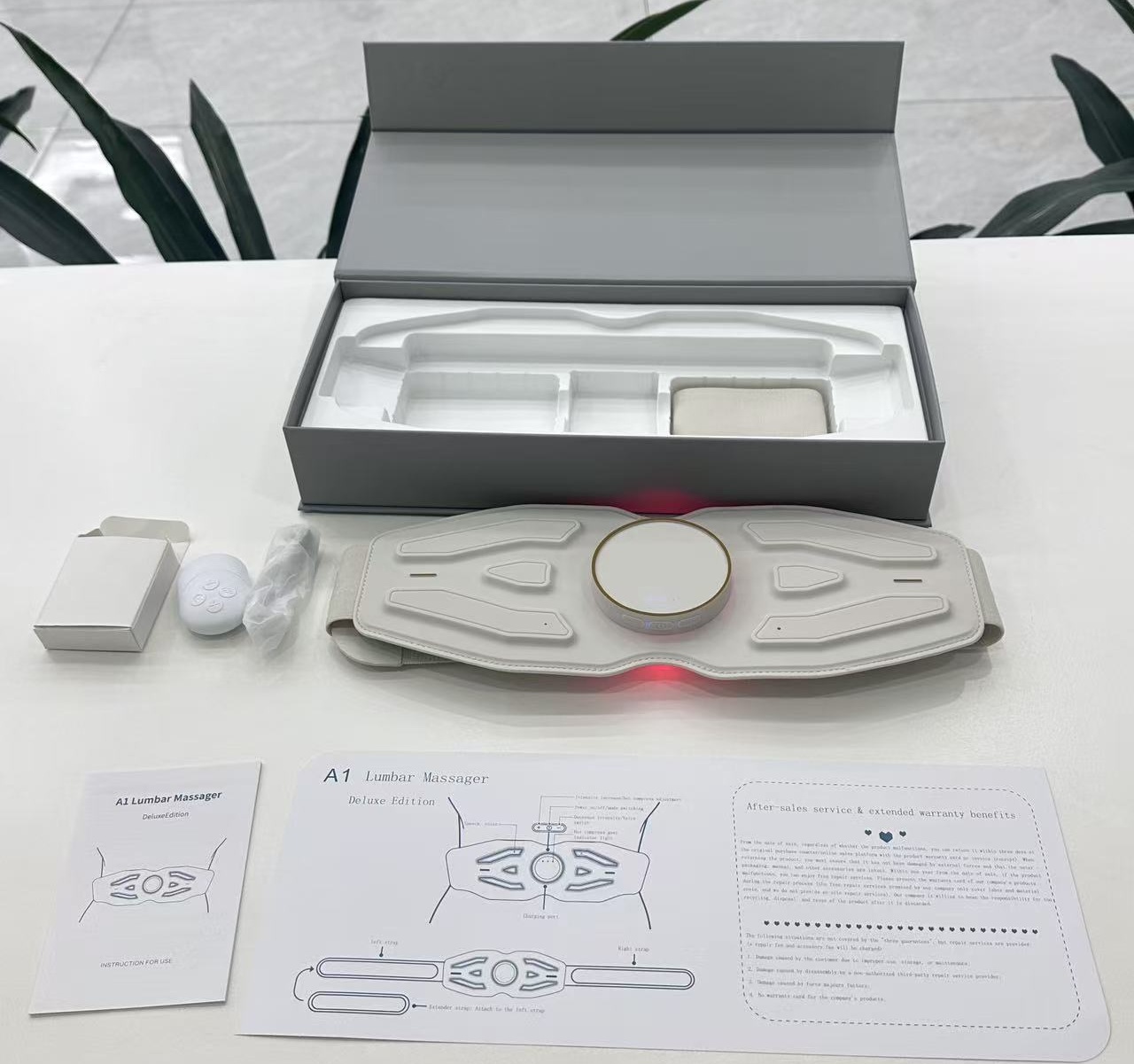
An opened sample helps define the views to retain for a pack approval. This example photo is not proof of the contents of a new order.
If a channel needs barcode-level traceability, define the data carrier in the order plan. GS1’s Application Identifier guidance explains how batch or lot data can be represented in a GS1 system. Using that format is a channel decision; it does not replace the buyer’s own configuration register or prove product compliance.
5. Inspect the first production pack and the shipment sample
Approve a first production pack against the signed reference set before volume packing continues. The buyer’s or inspector’s record should include the order key, unit and carton marks, actual belt and controls, manual and label revisions, accessories, pack arrangement and photographs. Where a function is part of the quotation, demonstrate it on that exact sample using its matching manual. A visually similar item is not an acceptable substitute for an agreed control variant.
At pre-shipment inspection, sample across the order’s cartons and variant lines rather than checking only the first box presented. The sampling plan and acceptance limits should be agreed in the purchase terms; the article cannot set a universal pass rate. Reconcile inspected unit marks with the carton list and the quantities by configuration key. If a mixed carton appears, determine the affected scope before releasing the remaining cartons.
6. Treat every change as a disposition decision
A change notice should state what changed, which lots and order lines are affected, and whether the accepted sample, manual, labels, artwork or listing must change. A new strap supplier, control board, firmware, remote, cable, carton insert or translated manual may look small in isolation but can alter fit, operating steps, pack contents or consumer claims. Ask for the revised evidence first; then decide whether to accept, rework, segregate or reject the affected units.
Do not hide an exception in a generic “same as approved” statement. Put it in an exception log with the supplier’s proposed remedy, the buyer’s decision, responsible person and closure evidence. If the change occurs after part of an order is packed, record which cartons carry each version. This is especially important when a brand sells the same belt through different marketplaces or distributors whose support teams rely on different manuals.
7. Close the order with a version reconciliation
Before release, compare four totals: quantity ordered by configuration key, quantity packed, quantity inspected and quantity listed for shipment. Match each carton range or lot to the approved document set and any accepted exceptions. Give the receiving warehouse a short identification sheet with sample photos, carton marks and the correct manual or label revision. It should be possible to locate a questionable unit without opening every carton.
Keep the signed register, reference samples, inspection records and change log for the next order. A repeat purchase should begin by asking which fields stay approved and which have changed; the old purchase order number alone is not a specification. Browse the Meilan waist massager collection for candidate models, then send the target market, channel and proposed order matrix to request a version-specific sample, document set and quotation.
Buyer FAQ
Can one approved sample cover both A1 and A9?
No. Keep a separate sample and document set for each model and quoted variant. Similar belt shapes do not establish matching controls or accessories.
What is the minimum information for a bulk-order configuration key?
Identify the model, confirmed variant or revision, market or language set, accessory pack and artwork revision, then use that key consistently across order and inspection records.
Does a new manual require a new hardware sample?
Not automatically. First determine whether operating steps, controls, warnings or claims changed. Approve the new manual against the exact hardware version and record the permitted pairing.
How should two packaging variants be ordered?
Give them distinct order lines or another unambiguous variant code, with quantities, artwork revisions and pack-out references for each.
What if a mixed carton is found before shipment?
Hold the affected scope, identify its configuration keys, inspect the remaining cartons under an agreed plan and document any rework or release decision.
Can the previous purchase order be reused as the next specification?
Use it as a starting record, then confirm the current sample, components, controls, manuals, labels and packaging before releasing a repeat order.

