


























Waist Massager Retail Demonstration
A wholesale guide to model-specific waist massager demonstrations, staff materials, sample upkeep and store rollout decisions.
 Meilan Tech 9 min read

A useful waist massager retail demonstration lets a customer see the exact product, understand its controls and leave with instructions that match the box. For a wholesale buyer, the task is to make that sequence repeatable across stores: approve a model-specific demo unit, a short staff script, a matching information pack and a routine for checking the sample. Keep the demonstration to observable product operation; do not turn it into treatment advice.
Decide what the demonstration should prove
A store demonstration serves two audiences. The shopper needs to see how the belt is positioned, how the available controls respond and what is actually included. The brand or distributor needs a presentation that different staff members can repeat without changing the product description. Start by writing down the sales setting: staffed counter, occasional assisted fitting or a display-only unit. That choice affects sample handling, power access, printed instructions and how often the unit must be inspected.
Keep the purpose narrow. A demonstrator can show the belt's form, fastening method, on-device controls and any quoted remote on a tagged sample. A brief in-store try-on may show whether the control can be reached in that setting. It cannot establish a medical outcome, a universal fit range or performance over months of use. The staff card should say which claims are supported by the current product documentation and which questions require a version-specific answer from the supplier.
Meilan's A1 product page lists on-device and wireless remote operation for its published configuration. The A9 page presents a separate waist model. A retailer should not demonstrate an A1 control sequence on an A9 unit or promise an A1 remote with another version. Put the exact sample ID, controller marking, leaflet revision and retail pack revision on one card before a script is written.
Build one model-specific control map for staff
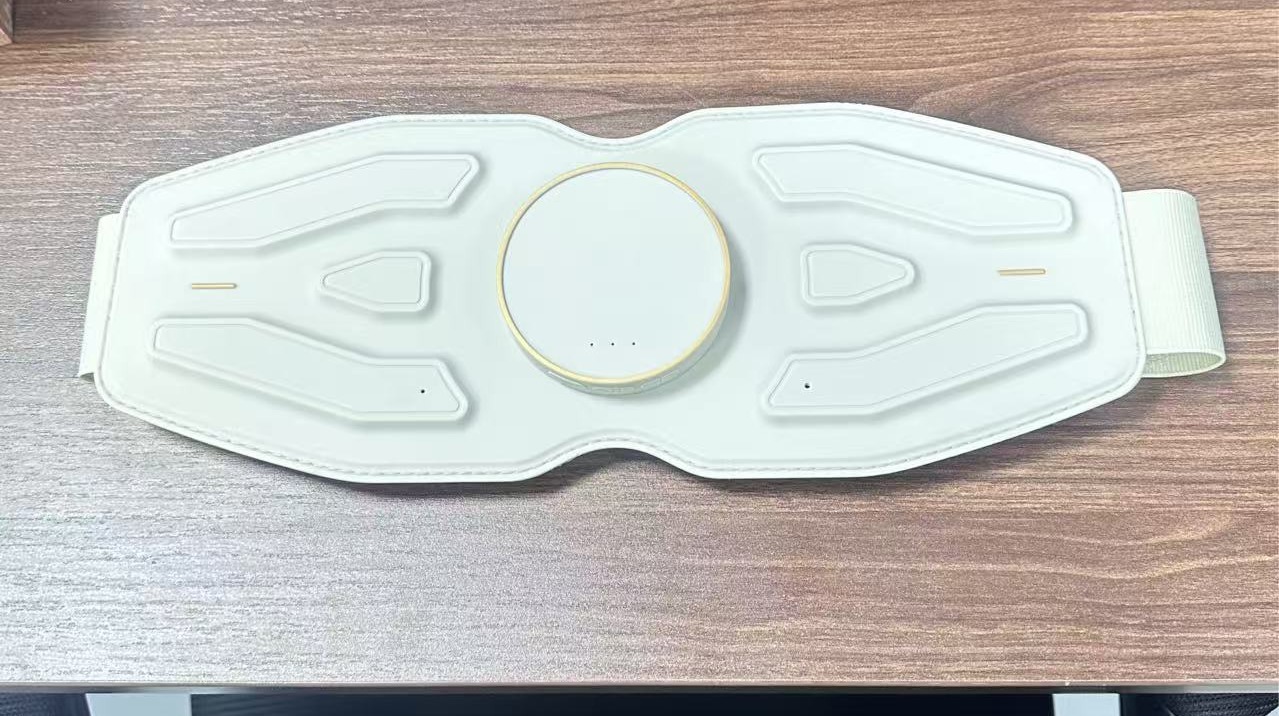
Lay out the sample, quoted accessories and matching manual together. Start from a known power-off state. Operate one control at a time and record the action, visible indication and stop step. If a remote is supplied, test it with the tagged main unit and record any first-use steps from its actual instructions; a similar-looking handset is not evidence of compatibility. Photograph the device in a neutral state and capture a short, continuous clip with the button press and response in the same frame.
| Staff-card item | What to show or record | Evidence needed before training |
|---|---|---|
| Product identity | Model and version on the demo unit, controller and retail box | Matching quotation, sample label and packing list |
| Fit and fastening | Orientation, adjustment and where the free belt end rests | Current fitting instructions and a measured sample if a size statement is planned |
| Start and stop | Power state, exact button action, indicator and safe return to off | Manual and a repeatable demonstration on the quoted unit |
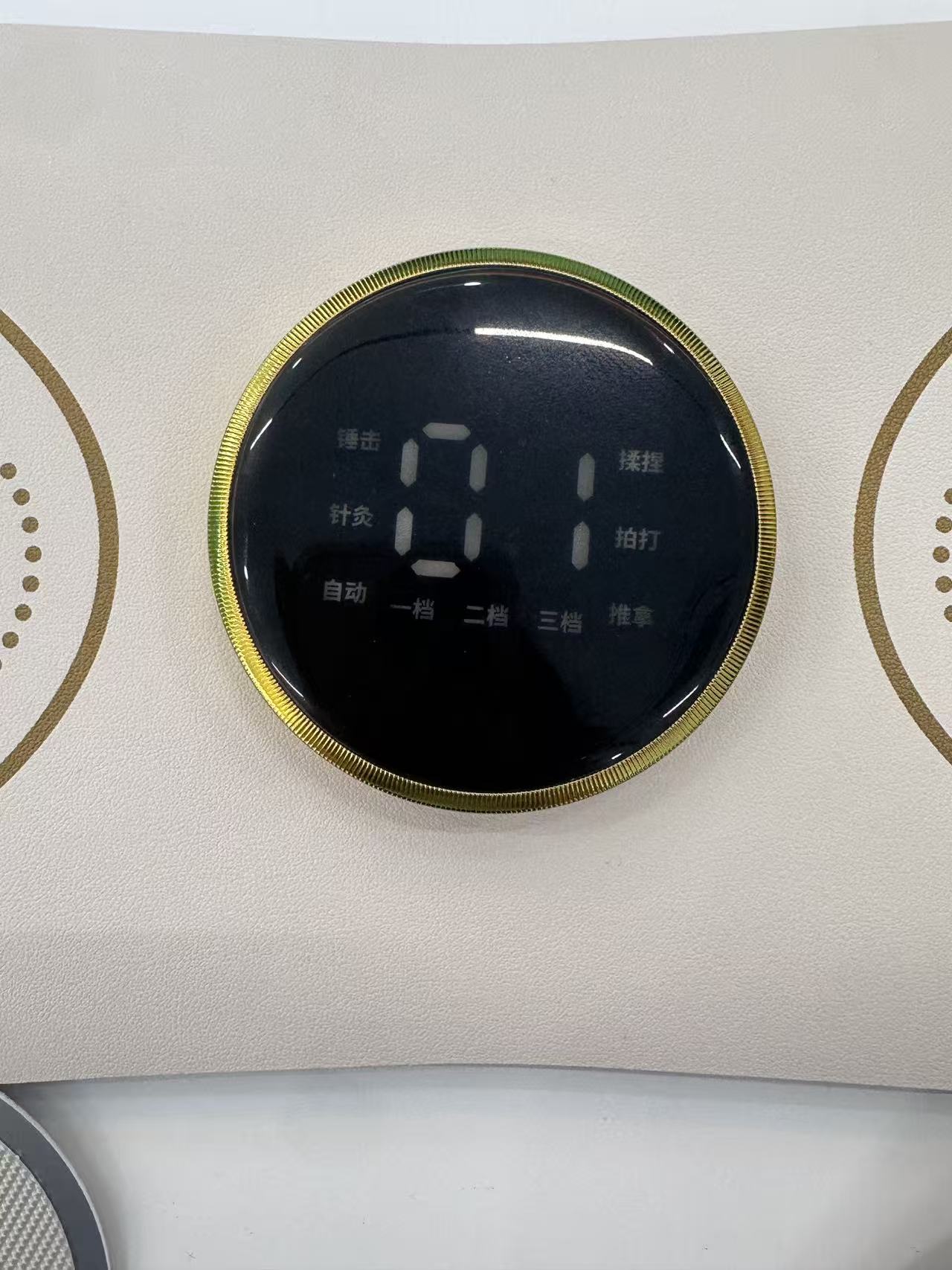
| Mode or level change | Observed sequence and indicator, without interpreting an unfamiliar icon | Model-specific control map approved against the leaflet |
| Remote or accessory | What is supplied, how it is identified and where it is stored | Quoted bill of materials, pack-out and matching first-use instructions |
Keep the card short enough for a counter worker to use while speaking. The full manual remains nearby for details and limitations. If the sample behaves differently from the printed guide, pause the demonstration and resolve the version mismatch before asking staff to improvise an explanation.
Use a demonstration sequence that a new colleague can repeat
The script should begin before the device is powered. Show the customer which unit is the demonstration sample, where the model is identified and which items are in a saleable box. Then orient the belt and explain the fastening path with the unit off. If assisted fitting is allowed by the store and the product instructions, let the customer see how the belt sits at a comfortable, ordinary position; do not force the belt to support a claimed waist range.
Next, use the documented start action and show one clearly named change in control state. Keep the display, button and resulting response visible. Finish by stopping the unit, removing or laying it down as instructed and returning the controls to a known state for the next demonstration. If a shopper asks for a feature not present on the exact sample, use the product sheet to identify the offered version instead of changing to another unit mid-script.
One trial run with staff who did not write the script is revealing. Ask them to demonstrate from the card and manual alone. Note where they hesitate: finding the power control, explaining an icon, fitting the belt, choosing between unit and remote, or knowing what comes in the box. Revise the card and training clip at those points. A script is ready when the observed action, spoken explanation and printed material agree.
Give the counter an information pack, not a stack of claims
A retailer needs different levels of detail for different moments. The counter card supports the live sequence; the customer leaflet explains use after purchase; the distributor file connects the quoted specification, accessories and approved retail artwork. Keep each document tied to the same model and revision. The A1 quotation-document guide shows why a specification, packing list and artwork should describe one offered configuration.
Use a simple distinction in staff language: “the sample shows” for an observed control action; “the manual states” for an instruction; and “we need to confirm the quoted version” when a specification or accessory is unresolved. Avoid converting a demonstration into advice about pain, recovery or treatment. If a customer asks whether the device suits a medical condition, staff should direct them to the product's safety information and an appropriate qualified professional rather than inventing a therapeutic recommendation.
Before approving print, compare the product name, buttons, illustrations, warnings, included items and contact details across the card, leaflet, carton and online listing. Translate the actual approved wording for each market. A QR code can point to a current manual or support page if the destination is maintained, but the essential first-use and safety information should still be available in the materials supplied with the product.
Manage the demonstration unit as shared store equipment
A display unit is handled more often than a customer's personal device. Give it an asset ID and a named store owner. At opening, check the belt for damage or a closure that no longer holds as intended, confirm the controls return to a known state, verify the correct remote and cable are present, and check the sample has enough power for the planned demonstration. Keep saleable stock separate so an opened demo unit is not mistaken for a new retail box.
Between assisted demonstrations, follow the current manual and the store's approved handling procedure for any surface cleaning and shared-contact precautions. Do not choose a chemical or cleaning frequency from a generic article; material compatibility and local store policy need to be resolved for the exact product. Store the belt without forcing a fold, protect the contacts and cable ends, and keep the remote with its tagged unit. Record a fault rather than repeatedly pressing controls to make a weak sample appear to work.
| Moment | Store record | Escalation trigger |
|---|---|---|
| Opening | Sample ID, condition, power, accessory count and leaflet version | Damage, missing part or an unfamiliar control state |
| After a demonstration | Return-to-off state, visible condition and approved cleaning step if applicable | Unrepeatable response, damaged closure or unclear handling instruction |
| Closing | Stored position, cable and remote location, charging status if specified | Persistent fault or sample no longer matching current saleable stock |
Plan replacement and version changes before rollout
A demonstration kit should have a replacement route. Decide who checks a failed sample, how a missing remote or leaflet is requested, and when the store must stop using the unit. Keep the approved control map and training clip with a revision date, not in an informal message thread. When the supplier changes the controller, display, belt, pack-out or instructions, retest the affected sequence and replace obsolete cards before the new stock reaches the counter.
For a distributor with several stores, separate a sample fault from a training issue. Ask a staff member to record the exact model, starting state, button action and result. If the same action works on a retained reference unit but not at the store, inspect the store sample. If multiple staff members misread the same icon or step, revise the materials. Both outcomes are more useful than a vague report that “customers do not understand the device.”
Approve a small store pilot before repeating the kit
Test the finished kit in the intended counter setting with the actual space, lighting, power access and staff schedule. A person who did not write the guide should be able to identify the model, run the approved control sequence, explain what is in the box, return the sample to a safe state and find the full instructions. Record the questions shoppers ask without treating a few conversations as market research or proof of product effect.
| Decision | Evidence to retain | Next step |
|---|---|---|
| Approve the kit | Version-matched unit, repeatable script, aligned printed materials and workable sample log | Issue the same revision to stores and train against the retained clip. |
| Revise and retest | Confusing icon, missing accessory, unclear fit step or awkward counter setup | Correct the card, pack or station and repeat the staff trial. |
| Hold rollout | Unverified control claim, mismatched manual, persistent sample fault or unresolved shared-use method | Request the missing version evidence before broader distribution. |
The procurement request should specify demo-unit quantity, exact model and control version, target markets and languages, printed and digital materials, replacement parts and the store maintenance method to approve. These are parts of one retail offer, not optional extras to discover after the first counter has been installed.
Buyer questions
Can one training card cover both A1 and A9?
Use a shared card layout if helpful, but give each quoted model its own control sequence, illustrations, accessories and leaflet reference. Verify each with its own sample.
Should the store demonstrate every mode?
No. Show the documented start, one clear change and stop sequence that staff can repeat. Keep the full instructions available for the remaining functions.
Can a retailer promise a fit range from a quick try-on?
No. A fit statement needs measured support for the offered belt and its fastening overlap. A short demonstration shows only how that particular sample is adjusted.
What if the remote does not respond at the counter?
Stop using that route, record the exact sample and starting state, then follow the matching manual's documented checks. Do not substitute another model's remote or invent a pairing step.
Who decides how the shared sample is cleaned?
Use the current product instructions together with the store's approved procedure. Confirm material compatibility and handling before rollout; do not rely on a generic disinfectant rule.
What belongs in a wholesale request for a demo kit?
Specify the model and version, demo quantity, target markets, accessory bundle, staff card, manual languages, training clip, sample log and replacement process.
Explore the Meilan waist massager range, then request a version-matched retail demonstration kit with the control, materials and upkeep checks your channel needs.

