


























Eye Massager Online Seller Support Guide
A purchasing guide for online sellers, distributors and gift buyers preparing model-specific instructions, issue routing, replacement stock and supplier service terms before launch.
 Meilan Tech 9 min read

Before selling eye massagers online, prepare a support file for each saleable version: operating instructions, an approved demonstration, a packing list, issue-routing rules and a named supplier contact. For distributors, online sellers and gift buyers, the purchasing decision includes who answers the customer, who authorizes a remedy and who pays for it. Agree these responsibilities before the first listing goes live.
1. Choose a model you can support as well as sell
An attractive product page starts the sale; a clear support process helps you fulfill the promise. A marketplace seller needs answers that agents can retrieve quickly. A distributor needs a file that downstream retailers can use consistently. A gift buyer also needs a route for recipients who may have no purchase receipt or access to the original buyer.
Meilan’s Y8 product page and Y9 product page identify two catalogue candidates. Y103 and Y5 are further enquiry options. Select the model and exact quoted version before preparing instructions; a shared family name does not establish identical controls, connectivity, accessories or service parts.
Ask for one support file tied to the retail SKU, model, hardware or firmware version where applicable, manual revision, language and destination market. Run a sample exercise: give the file and an unopened sample to someone who did not negotiate the order. Can that person identify the unit, check the contents and find the right instructions without asking the buyer? Record discrepancies before approving the listing.
2. Build a usable support pack rather than a folder of files
The useful unit is an answer an agent can find and apply. Keep the supplier’s full instructions, but add a short index that connects a customer’s question to the correct page, clip or packing record. A quick-start sheet should summarize approved instructions and retain the relevant warnings; it should not introduce an undocumented reset or operating shortcut.
| Asset to request | What makes it usable | Buyer acceptance check |
|---|---|---|
| Version-matched instructions | Readable target-language instructions with the correct controls, charging requirements, care guidance and warnings. | Compare the delivered sample with the diagrams and text; resolve conflicts before reusing them in the listing. |
| Short operating clips | Separate clips for the approved power, control and connectivity sequences applicable to that version. | The action and resulting indicator, display or prompt are visible or audible; the clip matches the supplied unit. |
| Pack and accessory record | An itemized contents list supported by an open-pack image and the order configuration. | Agents can distinguish an included item, optional accessory and shipping shortage without guessing. |
| Care and support scripts | Approved cleaning and storage wording, first-line checks and clear stop-use or escalation rules. | Instructions do not assume washable liners, removable parts or cleaning chemicals without version-specific approval. |
| Service terms and contacts | A market-appropriate customer policy plus the separate supplier claim process, authorized decision-makers and backup contacts. | The team can locate the current terms and knows which decisions it may make directly. |
Keep one approved release for the launch. When a cable, control layout, language file or package changes, check which clips, listing images and agent answers need updating. A QR code is useful only when it opens the right language and version; test the destination on a phone before printing it.
3. Route questions by what happened before deciding the remedy
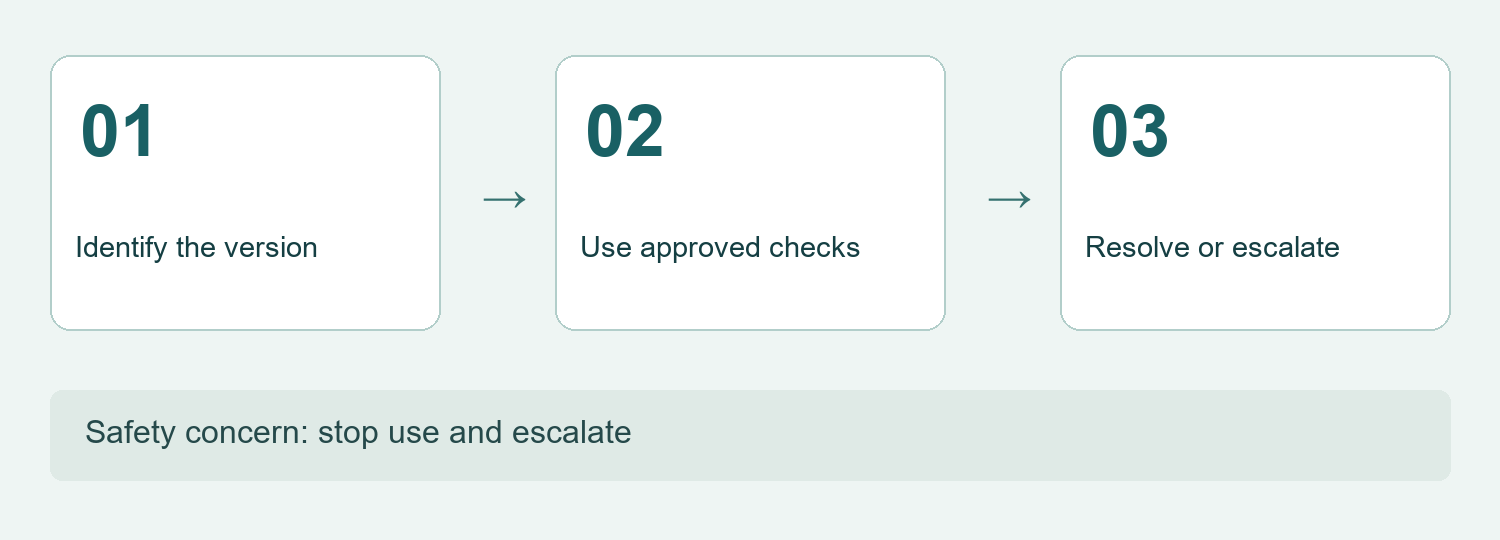
A customer saying “it does not work” has reported a symptom, not a diagnosis. Start with the order or recipient reference, product label, observed behavior and the step at which it occurred. Routine checks should follow the matching instructions. A report of smoke, swelling, burning smell, unusual heat, injury or significant discomfort needs immediate stop-use advice and escalation through the approved safety process, rather than repeated attempts to reproduce it.
| Reported issue | First-line route | Escalation boundary |
|---|---|---|
| No power or charging response | Identify the version, cable and power source; use only the connection and indicator checks authorized in its instructions. | Stop routine checks for damage or a safety concern; otherwise pass unresolved behavior with the checks already attempted. |
| Bluetooth or audio question | First establish whether the sold version includes the function; capture the phone, displayed device name and step reached. | Escalate a mismatch with the approved sequence; do not borrow a pairing name or reset from another model. |
| Buttons, modes or display | Compare the action and observed response with the correct diagram and demonstration. | A different control layout or undocumented response needs a version check before further advice. |
| Missing or damaged accessory | Compare the open-pack evidence with the agreed contents and shipping record. | A confirmed shortage follows the commercial remedy process; a photograph alone does not establish which item was included. |
| Fit, pressure or comfort concern | Use the approved fitting guidance only where appropriate; advise stopping use when discomfort is reported. | Do not coach a customer to endure pain or diagnose a medical condition; use the designated escalation route. |
For the handoff record, keep the symptom, exact version, relevant manual section, permitted action attempted, result and receiving owner together. The guide to eye massager support handoffs develops this agent-to-supplier transfer in more detail.
4. Agree the replacement route when buying the product
A spare cable can solve a confirmed accessory issue only when its specification and compatibility match the supplied version. Ask which items can be supplied separately, their part identifiers, compatible versions, packaging, minimum order quantities, prices and replenishment arrangements. Confirm whether a strap or contact component is actually replaceable; appearance alone does not establish that it is a service part.
Keep customer-installable accessories separate from internal components requiring an authorized service process. Do not turn a spare-parts list into instructions for customers to open a battery-powered unit. For an unresolved device fault, agree whether the supplier supports return assessment, authorized repair, replacement or another documented remedy.
Compare the full cost of the chosen route: spare stock, local handling, customer delivery, inspection, return transport and any supplier credit. A credit on a future wholesale order may not fund the replacement your customer needs today. Request separate prices and terms for complete replacement units and supported accessories; use the eye massager accessory checklist to keep the service stock distinct from each retail pack.
Choose an initial stock policy using your launch volume, supplier replenishment information and local fulfillment constraints. Without relevant sales and case history, there is no evidenced spare-stock percentage to quote. Review the policy against actual confirmed issues once sales begin.
5. Separate the customer promise from the supplier agreement
The customer-facing policy and the wholesale agreement serve different relationships. An agent needs to know what the seller may offer now, while purchasing needs to know what evidence the supplier requires and how costs are settled. Do not copy a warranty card into the listing without checking the market, sales channel and current agreement.
| Decision | Customer-facing responsibility | Supplier agreement to confirm |
|---|---|---|
| Returns and replacements | State the applicable route, conditions and customer contact clearly. | Define claim eligibility, evidence, assessment and the remedies available for the specific order. |
| Costs and cash flow | Know who can authorize a refund or replacement and fund customer fulfillment. | Allocate replacement goods, outbound and return transport, inspection and any credit or reimbursement. |
| Timing and ownership | Give only response and resolution commitments the seller can support. | Distinguish acknowledgement from a technical decision and final remedy; name a primary and backup owner. |
| Gift recipients and resellers | Allow an appropriate order, batch or recipient reference without assuming every user holds the buyer’s invoice. | Agree how downstream cases are identified and who consolidates the evidence for the supplier. |
For EU consumer sales, Your Europe’s guidance on guarantees and returns distinguishes statutory protection from an additional commercial guarantee. Use that distinction when reviewing the destination-market policy: a supplier warranty is not a complete statement of the seller’s obligations to consumers. Check the rules applicable to the actual market and channel before launch.
6. Turn support records into purchasing decisions
Use a compact case record: case ID, order or recipient reference, model and version, batch identifier where available, issue category, evidence, action, owner and outcome. Collect only the information needed for the case. A symptom video can focus on the controls and indicators without showing the customer’s face, private messages or medical history.
Keep an initial complaint separate from a confirmed fault. Track missing items, instruction questions, connectivity questions and device faults as different categories. Also separate a return request, an authorized return, a replacement and a refund; one case can pass through several events, so adding those event counts would double-count customers.
If reporting a return rate, define both the numerator and the population: which completed returns, which delivered orders or units, which market and sales period, and how late returns are handled. Keep the unit of analysis consistent. Without that definition and real records, a percentage is not a useful sourcing comparison. No return-rate benchmark or customer case is asserted here.
Review patterns with the supplier by version and batch. Repeated questions about one button may call for a clearer clip; repeated pack shortages may call for a packing check; recurring unresolved behavior needs technical investigation. Do not label every support contact a product defect, and do not treat the disappearance of tickets as proof that the underlying issue is resolved.
7. Rehearse the handoff before opening the listing
Test three proposed scenarios internally: a customer cannot follow a button sequence, an included cable is missing, and a unit is reported damaged. These are rehearsal cases, not actual Meilan customer incidents. Confirm that the agent can find the matching file, choose the permitted route, assign an owner and explain the next step without inventing a promise.
Release the listing when the product version, operating assets, pack record, service policy, replacement route and supplier contact have all been approved by their responsible owners. If a core item is missing, resolve it before launch or reduce the offered scope to what can actually be supported. A more elaborate model is a harder purchase to justify when its support requirements cannot be met.
Buyer questions before launch
Can one support file cover Y8, Y9, Y103 and Y5?
Use a shared case process, but keep model- and version-specific instructions, demonstrations, contents and compatibility records. Confirm each function before applying its script.
Should the supplier’s warranty card become our online returns policy?
Only after a market and channel review. The supplier agreement, commercial warranty and seller’s consumer obligations need to be considered separately.
How many spare units should we buy for the launch?
There is no verified universal percentage in this guide. Base the initial decision on volume, replenishment, local fulfillment and agreed remedies, then review actual case data.
Can customers replace a strap, liner or internal battery?
Only describe a replacement the supplier authorizes for that exact version and user. Do not infer removability or provide internal repair instructions from a product image.
What if the supplier has no agreed response time?
Resolve the ownership and escalation arrangement before making a customer response promise that depends on it. Keep acknowledgement, technical decision and final remedy distinct.
What should a distributor pass to downstream sellers?
Provide the approved language and version files, packing record, first-line boundaries, customer contact route and escalation requirements; retain control of subsequent updates.
Preparing an online launch or gift program? Send Meilan your support requirements with the candidate model and version, destination market, sales channel, planned quantity and preferred replacement route. Request the current operating pack, available service items, separate prices, packing information and written claim contacts before confirming the order.

