


























Waist Massager Distributor Replenishment Guide
A distributor purchasing guide to reconciling actual sales, usable stock and incoming orders, preserving the approved A1 or A9 version, and preparing a documented replenishment request.
 Meilan Tech 9 min read

A waist massager replenishment order should start with a dated stock count, actual sales records and the exact version to be supplied again. Reconcile usable stock, existing commitments and confirmed incoming goods before choosing a quantity. For distributors, online sellers and gift buyers, the aim is to buy the right configuration for a documented requirement without counting the same demand twice or assuming a fixed reorder cycle.
1. Define what the repeat order must repeat
“The same waist massager as last time” is not a complete purchasing instruction. A distributor may need continuity for several retailers, an online seller may need a precise match to a live listing, and a gift buyer may need one consistent pack across multiple delivery locations. Those requirements can differ even when the model name is unchanged.
The Meilan A1 product page and A9 product page identify two catalogue options. Choose the model and approved order version first. Do not combine A1 and A9 in one stock balance or treat them as substitutes merely because both are waist-worn products.
Tie each replenishment line to the retail SKU, supplier model, approved specification, sample reference, language, accessories and packaging revision. Keep a previous purchase order as a reference, then ask the supplier to confirm what is unchanged and disclose any proposed change. Approval of the earlier shipment does not automatically approve a new configuration.
2. Reconcile the inventory snapshot before reading the headline total
Use one timestamp, location and unit of measure for the count. Physical presence is different from availability for a new sale. A box may contain a reserved unit, a returned unit awaiting inspection, a demonstration sample or a version intended for another market. Separate those states before deciding what can cover the requirement.
| Stock record | How to establish it | How to use it in the decision |
|---|---|---|
| Usable, uncommitted stock | Match the counted units to the required version and location; exclude units already assigned to other commitments. | Use only this reconciled balance to cover additional requirements. |
| Reserved or allocated stock | Link each reservation to its order, retailer or recipient allocation. | Keep the stock and the demand it covers paired; do not subtract the reservation twice. |
| Returns, holds and samples | Record the reason for the hold and the person authorized to release it. | Exclude these units until their condition and saleability are confirmed. |
| Incoming goods | Identify the open purchase-order line, version, remaining quantity, allocation and expected available date. | Count only matching, unallocated units that can be available by the required date; keep late or uncertain arrivals separate. |
| Quantity basis | Distinguish complete saleable units, loose accessories, retail packs and shipping cartons. | Convert using the confirmed packing configuration rather than treating a carton count as a device count. |
Check what your system’s fields mean. For example, Shopify’s inventory-state definitions distinguish on-hand, available, committed, unavailable and incoming quantities. An available balance already excludes committed stock in that system; subtracting it again would understate availability. Use the definitions of your own warehouse or sales platform rather than assuming that every report uses the same calculation.
3. Read actual sales in their selling context
Prepare a historical sales extract by the same SKU, version, market and channel as the stock count. State the period and whether the record measures orders placed, units shipped or completed consumer sales. Record cancellations and returns separately, and show whether a returned unit has actually re-entered usable inventory.
A distributor’s shipment to a retailer and that retailer’s sale to a consumer are different events. Use retail sales data when it is available and relevant; otherwise label the figures as distributor shipments. A gift allocation is a project commitment, not evidence of recurring retail demand. Combining these records into one undifferentiated “sales” total can distort the purchasing discussion.
Mark stockout periods, promotions, listing changes and one-off bulk orders. Low shipments while the item was unavailable do not establish low demand, and a promotional spike does not establish a continuing sales rate. Historical data supports a review; projecting it requires explicit assumptions and an approved planning method. This guide does not turn missing records into a forecast or prescribe a fixed replenishment interval.
4. Calculate a dated shortfall only after defining the inputs
Set the required available date: when the goods must be received, checked and ready for the relevant channel. Then identify confirmed demand not already covered by reservations or other allocations. If the buyer wants an uncommitted closing-stock balance as well, record that separately with its approver. It is a buyer decision, not a stock target inferred automatically from recent sales.
| Input | Definition for this worksheet | Required evidence or decision |
|---|---|---|
| D — uncovered confirmed demand | Accepted requirements due within the chosen period that have no stock or incoming goods already assigned to them. | Reconciled order or allocation records; exclude commitments already covered elsewhere. |
| B — approved closing-stock balance | The uncommitted usable balance the buyer has explicitly chosen to retain at the end of that period. | A named approval and planning basis; do not silently set an unknown value to zero. |
| U — usable uncommitted stock | The matching-version stock available at the snapshot, without existing reservations or holds. | Warehouse count and reservation reconciliation using one consistent definition. |
| I — eligible incoming stock | Matching-version, unallocated units confirmed to be available by the required date. | Open-order balance, arrival and receiving information; separate uncertain or late goods. |
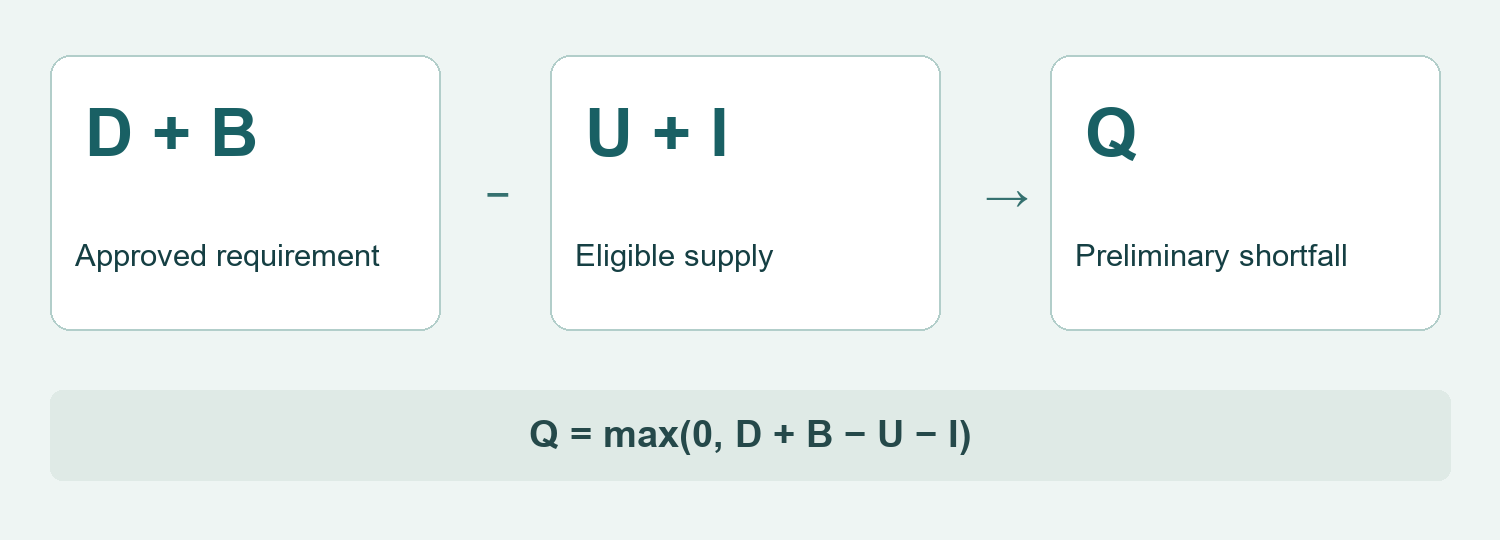
| Q — preliminary purchase shortfall | The positive remainder after the approved requirement is compared with eligible supply. | Calculate only when D, B, U and I have been established; an unknown input remains unresolved. |
The reconciliation is Q = max(0, D + B − U − I). Use the same device units, version and dated scope throughout. Demand already covered by reserved stock or an allocated incoming shipment must stay outside D; the corresponding allocated supply must stay outside U and I. This keeps each commitment and its supply out of the calculation together. Where requirements have different deadlines, reconcile them in date order. A shipment arriving after an individual deadline cannot cover that earlier requirement.
Q is a preliminary quantity, not a supplier offer or a sales forecast. Check it against the proposed minimum order and carton multiple, then obtain approval for any extra quantity those conditions introduce. A numerical shortfall does not establish that the supplier can deliver in time. When the records are incomplete, use the separate blank worksheet to obtain them rather than presenting an invented answer.
5. Keep version changes out of the routine reorder
Compare the proposed supply with the approved reference before repeating the SKU. A visually similar belt can still require different instructions, accessories or packing. Use the waist massager structural-change briefing guide when the supplier proposes a physical change; a change request needs its own decision rather than being hidden inside “repeat order.”
| Reference to compare | What to confirm for the new supply | Decision before release |
|---|---|---|
| Belt and fastening | Approved dimensions, attachment points, adjustment method and any changed components. | Compare a version-matched sample; use the belt-sizing measurement guide to specify the checks. |
| Controls and operating configuration | The supplied controls, instructions and any hardware or firmware revision relevant to the order. | Resolve differences before reusing listing copy, support instructions or the previous approval. |
| Accessories and language | The exact included items, their specifications and the destination-language documents. | Confirm compatibility and the current contents list; distinguish optional items from included items. |
| Retail pack and carton | Artwork revision, barcode assignment, packing method and shipping-carton data. | Approve the pack and warehouse mapping before mixing new and existing stock. |
If an approved change makes the units commercially different, decide how the warehouse, product listing and downstream sellers will distinguish them. A separate internal SKU, lot record or other version identifier may be needed. Ask for any barcode decision under the applicable identification rules; do not assume every small change always requires a new barcode, or that a supplier may reuse one without review.
6. Request a fresh quotation and packing confirmation
Send the reconciled requirement together with the version reference and required available date. Request current unit prices, currency, delivery terms, price validity, quantity conditions, payment terms and any separately charged customization or packaging work. A previous price helps the comparison but does not confirm the current order.
Ask the supplier to separate stock availability, production readiness and shipment readiness. Connect those dates to freight, clearance where applicable and receiving checks. The relevant date is availability for your channel, not simply factory dispatch. If timing is uncertain, discuss a confirmed allocation or another documented option before making a downstream promise.
Obtain the packing data for the actual ordered configuration: units per carton, carton count, outer dimensions, gross weight, carton markings and the treatment of partial cartons. Ask whether different versions or accessory-only items will occupy separate cartons. Do not copy old packing values merely because the model name is the same.
Where minimum quantities or full cartons increase the order beyond Q, show the additional units and cash commitment separately. Compare accepting the excess with a supplier-confirmed alternative such as a different quantity arrangement. Do not assume smaller orders, split deliveries or price concessions are available until the supplier confirms them.
7. Close the loop from purchase approval to warehouse receipt
Release a replenishment order only when its quantity basis, version reference, price scope, packing and delivery plan are approved. Give sales, purchasing and the warehouse the same order revision. Record who accepts a substitution or revised date; silence should not become approval.
After release, record the purchase as incoming supply once. As shipments are received, reduce the outstanding purchase-order balance and move accepted units into the appropriate stock state. Keep shortages, inspection holds and wrong-version units separate. Leaving received units in both incoming and available balances would make the next replenishment review overstate supply.
Use actual receipt and allocation records to close the order, then retain the differences between ordered, shipped, received and accepted quantities. Review those records alongside actual sales at a time suited to the channel’s operations. Choose the next review date deliberately; this article does not impose a universal weekly or monthly cycle.
Questions distributors ask before a repeat order
Can A1 and A9 share one replenishment line?
Keep them separate unless the buyer has expressly approved a substitution and its commercial consequences. Stock for one model does not automatically cover demand for the other.
Can available stock be reduced by reservations again?
Only if the original balance includes those reservations. Check the system definition; a balance already net of reservations must not have them deducted twice.
Should every open purchase order reduce the new order quantity?
No. Count only the matching, unallocated balance confirmed to be usable by the required date. Keep late, uncertain or already allocated supply outside I.
Can the last shipment’s price and carton quantity be reused?
Use them as reference values only. Confirm the current quote and packing for the exact repeat-order configuration.
What if sales, stock or the closing-stock decision is missing?
Leave the quantity decision unresolved and request the records or approval. An unknown input is not zero, and this guide provides no fabricated sales or stock figures.
Does a reorder need the full original sample process again?
Use the approved reference and review the changes. Request targeted checks for any changed or uncertain element; a past approval is not evidence that the new supply is identical.
Planning an A1 or A9 repeat order? Send Meilan your replenishment brief with the approved model and version, dated stock record, confirmed uncovered requirements, requested quantity and required available date. Ask for a current quotation, change confirmation and configuration-specific packing information before releasing the purchase order.

